MCP RTK: cut 90% of MCP server tokens
🇫🇷FRMCP RTK is a Rust proxy that filters MCP server responses through an 8-step pipeline, reducing Claude Code's token usage by 60 to 90%.
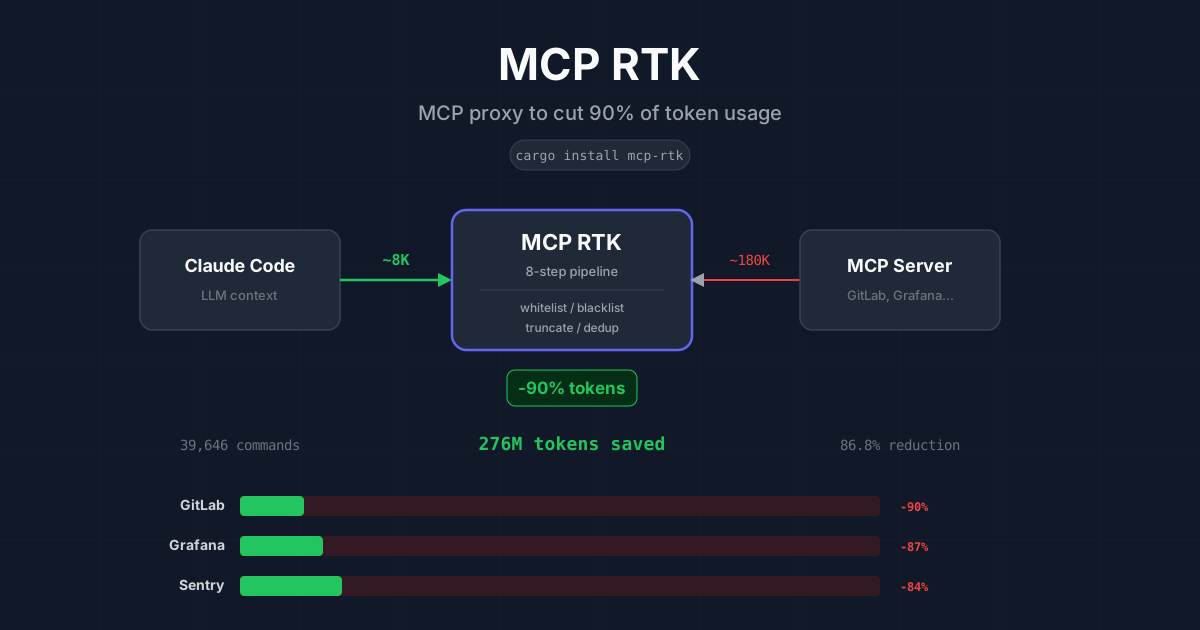
I use Claude Code every day for development. Like many developers, I’ve connected several MCP servers (GitLab, Grafana, Sentry…) to give Claude direct access to my tools. The problem: every MCP call injects tens of thousands of tokens into the context, and the bill spirals fast.
I built MCP RTK to fix this. It’s an MCP proxy written in Rust that sits between Claude Code and MCP servers, filtering responses before they reach the model. Result: over 267 million tokens saved across my 38,000+ commands.
The problem: oversized MCP responses
The MCP protocol (Model Context Protocol) lets Claude interact with external tools. When Claude calls an MCP tool, the server returns a JSON response. The issue is that these responses often contain:
- empty or null fields that add nothing
- technical metadata (internal timestamps, pagination IDs, HTTP headers)
- very long values (full logs, HTML descriptions, entire diffs)
- arrays with dozens of entries when 5 would suffice
A single list_issues call on GitLab can consume over 180,000 tokens. Claude only needs a fraction to answer the question. The rest is pure waste.
Over a typical work session with 50 to 100 MCP calls, that easily adds up to 500,000 wasted tokens injected into the context.
The solution: an 8-step filtering proxy
MCP RTK sits transparently between Claude Code and MCP servers. No workflow change needed: Claude keeps calling the same tools, but responses pass through a filtering pipeline before reaching the context.
The pipeline has 8 steps:
- Remove null and empty fields - fields without values are stripped
- Truncate long strings - values exceeding a configurable threshold are cut
- Field whitelist - only useful fields are kept
- Field blacklist - known useless fields are removed
- Deduplication - identical entries are merged
- Array compression - long arrays are sampled
- Technical metadata removal - API-internal fields are stripped
- Normalization - output format is standardized
Each step is independently configurable. You can enable or disable each filter, adjust thresholds, and define server-specific rules.
Configuration with presets
Configuration uses a TOML file. MCP RTK ships with community presets for popular servers:
[servers.gitlab]
preset = "gitlab"

[servers.grafana]
preset = "grafana"

[servers.sentry]
preset = "sentry"
Each preset defines which fields to keep, which to exclude, and appropriate truncation thresholds for the server. For custom servers, you define rules directly:
[servers.my-api]
whitelist = ["id", "name", "status", "created_at"]
max_string_length = 500
max_array_length = 10
MCP RTK auto-detects installed MCP servers and offers to configure them.
Results
Across my 38,000+ commands, MCP RTK has saved 267 million tokens with an average reduction rate of 87%. On Opus 4.6 ($15/M input tokens), that’s roughly $4,000 in savings:
Useful information is preserved. Claude responds with the same accuracy, but consumes far fewer tokens per session. The mcp-rtk gain command lets you track savings in real time:
Tokens saved:      267.1M (86.7%)
Efficiency meter: █████████████████████░░░ 86.7%
Installation
MCP RTK is distributed as a single binary:
cargo install mcp-rtkOne line change in your Claude Code config - wrap the existing MCP command with mcp-rtk --:
{
  "mcpServers": {
    "gitlab": {
      "command": "mcp-rtk",
      "args": ["--", "npx", "-y", "@nicepkg/gitlab-mcp"],
      "env": { "GITLAB_PERSONAL_ACCESS_TOKEN": "glpat-..." }
    }
  }
}
MCP RTK detects the upstream server from the command and loads the matching preset automatically.
Why Rust?
Rust was a deliberate choice. The proxy must process every MCP response with minimal latency to avoid slowing down the workflow. Rust provides:
- near-instant startup (no JVM, no runtime)
- minimal memory footprint (a few MB)
- a single binary with no dependencies to install
- compile-time memory safety guarantees
The code is open source
MCP RTK is published under the MIT license on GitLab (mirror on GitHub). Community presets are maintained by users: anyone can contribute their own configurations for new MCP servers.
The project is part of a tooling ecosystem I’m building around Claude Code, alongside Skill Radar (detecting repetitive patterns in sessions) and Claude Deck (multi-workspace for parallel sessions). To learn how to write your own skills, see the guide on effective skills. The same “load less” principle applies to skills themselves: past ~30 skills, adding more degrades the agent. The project page has installation links and documentation.
Frequently asked questions
What is MCP RTK?
An open source proxy written in Rust that sits between Claude Code and MCP servers. It filters JSON responses through an 8-stage pipeline before they reach the model context.
How many tokens does MCP RTK save?
60 to 90% depending on the server: 75K tokens down to 8K on a GitLab MR listing, 110K to 15K on Grafana dashboards. Over 38,000 commands, 267 million tokens saved.
Why do MCP server responses use so many tokens?
They include empty fields, technical metadata, very long values (logs, diffs, HTML) and full arrays. A single GitLab list_issues call can exceed 180,000 tokens.
How do you install MCP RTK in Claude Code?
Install the binary, then prefix the existing MCP server command with mcp-rtk -- in your Claude Code config. The proxy detects the upstream server and loads the matching preset.
Does MCP RTK reduce answer quality?
Not in my usage: filters drop useless fields and keep useful information. Each stage is configurable per server if an important field gets removed.